Wedding QR code sign ideas: sizes, styles and wording that get scanned
Why the sign changes your guests' experience
A well-designed QR code sign is the difference between a few guests signing and almost all of them. It's that simple: if the code is visible, clear and good-looking, people scan it. If it's hidden in a corner, many guests never find out it exists.
This guide covers sizes, four styles you can make yourself, wording and printing, plus the most common mistakes. If you're already thinking about QR codes on your wedding tables, this is the companion piece.
Recommended sizes by location
The sign at the reception entrance isn't the same as the little card on each table. These sizes work best:
- Entrance or main table sign: 11 × 17 in, or larger.
- Sign on an easel: 8.5 × 11 in, vertical.
- Cards on guest tables: 4 × 6 in or 5 × 7 in.
- Bookmark-style card: 2 × 6 in with a small code and a short link.
The QR code itself should be at least 2 × 2 in to scan well from about three feet away, and 3 × 3 in or more on large signs.
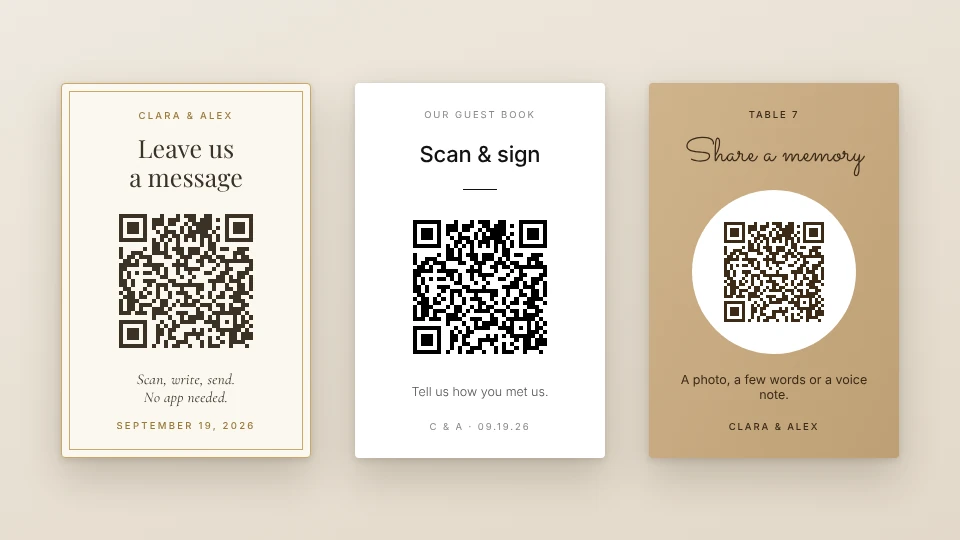
Classic and elegant
Made for formal weddings at an estate, a hotel or a traditional ballroom. You'll recognize it by:
- A serif typeface (Playfair Display, Cormorant or Cardo).
- Ivory or off-white heavy card stock.
- Gold or champagne details for the border and the code.
- A central line such as "Leave the couple a message" or "Sign our guest book."
It's the safest bet: it goes with any decor and always looks refined.
Romantic and floral
Ideal for garden weddings, spring dates or a pastel palette.
- Watercolor flowers in the corners (peonies, eucalyptus, olive branches).
- Mixed type: an elegant serif for the title and a script for the names.
- Soft colors: dusty rose, sage green, cream.
- A floral frame around the code.
Modern and minimal
For couples who like restraint and contemporary design.
- Lots of white space.
- A clean sans-serif (Helvetica, Inter, Manrope).
- A single thin line as decoration.
- A pure black code with no frame.
- A short, direct line: "Scan & sign."
Rustic and boho
For weddings in the countryside, at a barn, in the woods or on the beach.
- A kraft paper background or a wood texture.
- A handwritten typeface such as Allura or Sacramento.
- Details like dried leaves, twine or ribbon.
- The code on a white circle to keep the contrast.
How to choose the style for your wedding
Before designing anything, ask yourself three questions:
- What's the venue like? A rustic barn calls for kraft and wood. A city hotel calls for minimal.
- What's your color palette? The sign should match it, not compete with it.
- What tone do you want? Romantic, formal, fun, understated.
If your wedding is classic with cream and gold tones, go elegant. If it's outdoors with fresh flowers, go floral. If it's modern, in a boutique hotel, go minimal. If it's rustic, at a farm or on the beach, go boho.
What to personalize on any sign
Whatever style you choose, there are three things you should always personalize:
- Your names and the date: they give the sign its identity.
- The real QR code: the one for your own guest book, which you get when you create your event.
- The main line: short, clear and in your guests' language.
Free tools for designing it
- Canva (free, with ready-made sign templates to adapt).
- Figma (more control if you're comfortable with design tools).
- PowerPoint or Keynote if you only need something quick.
Wording that works best
- "Scan, sign and leave us a memory"
- "Your message will make our day"
- "Sign our digital guest book"
For lines built around a question ("Tell us how you met us"), see these wedding guest book prompts.
How to print it properly
Three quick tips that make the difference:
- At least 300 dpi. Never export the sign at 72 dpi: it will look pixelated.
- Ask your printer which file format they prefer. A print-ready PDF is the usual answer.
- Heavy card stock (around 100 lb cover) for standing signs, in a matte or satin finish to avoid glare on the code.
A local print shop you trust or an online printer will both do the job.
Recommended materials
Paper is what separates a "homemade" sign from a professional-looking one:
- Heavy matte or satin card stock for letter-size and 11 × 17 signs.
- Foam board (3/16 in) if you want a rigid sign on an easel.
- Adhesive vinyl if you're putting the sign on a mirror or glass.
- Laser-engraved wood for rustic weddings (it looks spectacular, though it needs a specialist).
For table cards: card stock at 4 × 6 in, optionally double-sided with the line on the front and the code on the back.
Where to place the signs for maximum visibility
A beautiful sign in the wrong place is useless. Strategic spots:
- The entrance to cocktail hour: a large sign on an easel.
- The photo backdrop: it reinforces the natural flow.
- The gift or card table: everyone passes by.
- The paper guest book table (if you have one): a letter-size sign next to it.
- Every reception table: a small card with the code.
The golden rule: better to repeat the code five times than to hide it once.
Match the signs to the rest of your stationery
Your QR code sign shouldn't stand apart. Ideally it matches:
- The invitations.
- The seating chart.
- The menus.
- The table numbers.
- The favors.
Ask your stationer to use the same typeface and palette across everything. If you're doing it yourself in Canva, save your colors so you can reuse them in each design.
Pairing the QR code sign with a paper guest book
Many couples go back and forth between paper and digital. The truth is they work better together. One idea that always delivers: put the QR code sign right next to the traditional book. That way:
- Anyone who wants to can sign by hand.
- Anyone who prefers digital scans the code and leaves a note with a photo (and a voice note, if you turn them on).
- Older guests have their option and younger ones have theirs.
- In the end, you receive two keepsakes that complement each other.
The sign should be as pretty as the book, so together they make an elegant corner.
Test the code before the big day
This is mandatory: test the code before printing a hundred copies.
- Print a single test sign.
- Scan it with 3 different phones (an iPhone, an Android, an older one).
- Do it from different distances: one foot, three feet, six feet.
- Try it in bright light and in dim light.
- Check that it opens the right page: your guest book.
If everything works, send the full run to print.
Design mistakes that spoil a sign
- Too much text: the sign should be readable in 2 seconds.
- Hard-to-read type: extreme scripts look gorgeous and nobody can decipher them.
- Low contrast: a light gray code on a cream background is unreadable.
- A code that's too small: under about 1.5 inches, many phones struggle.
- A code over a busy image: always put a white or solid-color box behind it.
- Effects on the code: no gradients, logos, stickers or text on top.
- A code pushed to the edge: leave a clear margin of about 3/4 inch around it.
Digital versions for texts and social media
Besides the printed sign, prepare a digital version of the code to send:
- For texts and group chats: a square image, 1080 × 1080.
- For Instagram Stories: vertical, 1080 × 1920.
- For email: a horizontal image, 1200 × 630.
That way the book reaches guests who couldn't attend in person, and you collect more messages.
Frequently asked questions
Where do I get the QR code?
When you create your event in EventGuestBook you get your book's QR code and its link. Add the code to the design you've chosen and print.
Can I change the colors to match my wedding?
Of course. Keep the code itself dark on a light background so it scans reliably, and use your palette for everything around it.
How many signs should I print?
We recommend one large sign at the entrance, one in the cocktail area, a small one on each table and one next to the paper book (if you have one). Better to repeat the code than to hide it.
Is the same code used on every sign?
Yes. It's one code for the whole event. Only the number of copies changes.
Ready to have your QR code in under 5 minutes? Create your digital wedding guest book. It's free to start.
Related articles
Digital guest books for wedding planners: how to offer one to your couples
An extra that adds no logistics to the wedding day if you plan it well: who creates it, when to set it up, how to show it on a screen and which plan suits each couple.
7 min
Messages, photos and voice notes: what your wedding keepsake looks like when guests give all three
A message tells you what someone thinks, a photo shows how it felt and a voice note gives you their voice back. Here is how your wedding keepsake changes when guests leave all three.
8 min
How to get guests to sign your wedding guest book
Participation is a matter of friction and timing, not nagging. What actually moves the needle before, during and after the wedding.
8 min