QR code wedding guest book: how it works and how to use it at your wedding
The short version
A QR code guest book is a simple way to collect messages and photos from your guests through their phones. Instead of relying only on a paper book on a table, you place a QR code at the wedding or send the link ahead of time, so guests can take part before, during or after the event.
The idea is simple: the couple creates the digital book, shares the QR code and each guest writes from their phone's browser, with no app to download. If the host allows it, they can add a photo to their message.
With a tool like EventGuestBook, the messages are kept together in an online book and can be shown on a live wall during cocktail hour, dinner or the party.
What is a QR code guest book?
It's the digital version of the traditional guest book, or its digital companion. Instead of asking guests to walk over to one table and write on paper, you give them access to an online book through a QR code.
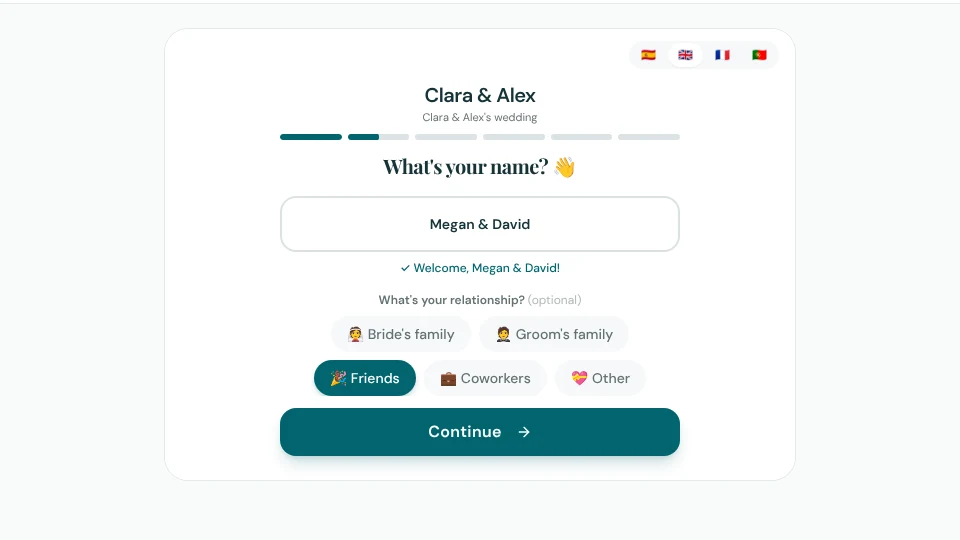
When someone scans the code with their phone camera, they land on a page where they can leave their message. They don't need to install an app, create an account or understand anything technical. It should feel as natural as opening a web page, writing a note and sending it.
At a wedding, this solves a very common problem: the paper book looks lovely, but it doesn't always get signed. Some guests never see the table, others forget during cocktail hour, some don't know what to write on the spot and others would rather do it calmly the next day.
The QR code removes that friction. People take part when it suits them, and you collect things a paper book can't easily hold: candid photos, messages from guests who couldn't make it and notes that can appear during the event on a live wall.
To see how this looks for a wedding, visit the digital wedding guest book page.
How it works, step by step
It may sound technical, but using a QR code guest book at a wedding is straightforward. The couple sets it up beforehand and guests join in without complicated instructions.
-
Create your digital guest book. Set up the event, choose the name guests will see and decide how you want to receive messages and photos.
-
Get your QR code. The code points to your event's book. Print it, put it on a sign or add it to a card.
-
Place the QR code at the wedding or share the link. The code works well in the venue, and the direct link lets people take part before or after.
-
Guests leave messages and photos. Each person writes from their phone. They can add a picture to their message.
-
Everything is saved in one online book. The messages are gathered in one place you can read, keep and share.
-
If you like, show them on a live wall. During cocktail hour, dinner or the party, open the live wall on a TV or projector.
The key is to combine the QR code and the link. The code drives participation at the venue. The link reaches guests in the days before and after.
For the overall flow, see how a digital guest book works.
Where to put the QR code at the wedding
Placement has a big effect on participation. Hide the code in a corner and few guests will use it. Put it where people naturally pause and it becomes part of the experience.
These spots tend to work especially well:
- The entrance. It's the first place guests look to get their bearings.
- The seating chart. Almost everyone walks up to find their table, so the code gets plenty of attention.
- Reception tables. A small card with a clear line reminds each guest they can take part.
- The welcome table. If you have a spot for favors, flowers or decor, the code fits right in.
- The photo backdrop. People already have their phones out and are thinking about pictures.
- The bar. While they wait for a drink, many guests have a few seconds to scan.
- A card inside the paper book. If you're keeping a traditional book, the QR code complements it.
- A screen or sign. A visible sign next to the live wall helps explain what's going on.
- The digital invitation. Include the link or the code in your pre-wedding messages.
- Menu cards. They work well if the design is clean and the instruction is short.
There's no need to cover the venue in codes, but guests should get several chances to see one. Pair the code with a simple line: "Leave us a message," "Scan and write us a memory" or "Sign our digital guest book."
For wording and layout ideas, see these wedding QR code sign ideas.
Sharing the link before the wedding
One big advantage of a QR code guest book is that it doesn't depend only on the wedding day. The same book can be shared as a link by text, email or group chat before the event.
That opens up some useful possibilities:
- Guests can write calmly before the wedding.
- Family and friends who can't attend can still send a message.
- Older relatives can ask someone close for help and take their time.
- Groups of friends can prepare something more personal.
- After the wedding, anyone who forgot to sign can still leave a memory.
Send the link along with your reminder about timing, location or transportation. It doesn't need much explanation. Something like this is enough: "We'd love for you to leave us a message here. You'll also be able to scan the QR code at the wedding."
The link complements the printed code. The code helps at the venue. The link helps in the days around it.
What guests can do
The guest experience should be quick, clear and friendly. Not everyone is equally comfortable with technology, so the less you have to explain, the better.
In an online guest book, guests can:
- Write a message from their phone's browser.
- Sign with their name, as a couple, as a family or as a group of friends.
- Add a photo (up to 4 with Premium).
- Take part without downloading an app.
- Get in through a QR code or a link.
- Send their message before, during or after the wedding.
- Join in from home if they can't attend.
The result is a wider range of memories: inside jokes, messages from faraway relatives, candid photos and notes written with a little more time.
Advantages over a traditional guest book
The traditional guest book has charm. It can be decorative, anchor the welcome table and become an object to keep. That's why a QR code guest book doesn't always have to replace it. At many weddings, the best answer is both.
The digital format brings clear advantages:
- More guests take part. The code can be in several places, and nobody has to pass by one table.
- It can be shared before and after. The paper book lives at the event. The link travels.
- It takes photos. Messages can come with pictures taken during the day.
- No lines. Each guest signs whenever they want.
- It keeps messages organized. Everything is gathered in one online book that's easy to browse.
- It can go on screen. Some messages become part of the atmosphere.
- It includes absent guests. People who aren't there in person can still contribute.
- It's easier to read later. No deciphering handwriting or hunting for a page.
The decision doesn't have to be "paper or digital." Many couples keep a pretty physical corner and add a QR code to collect more messages, photos and memories.
Showing messages on a live wall
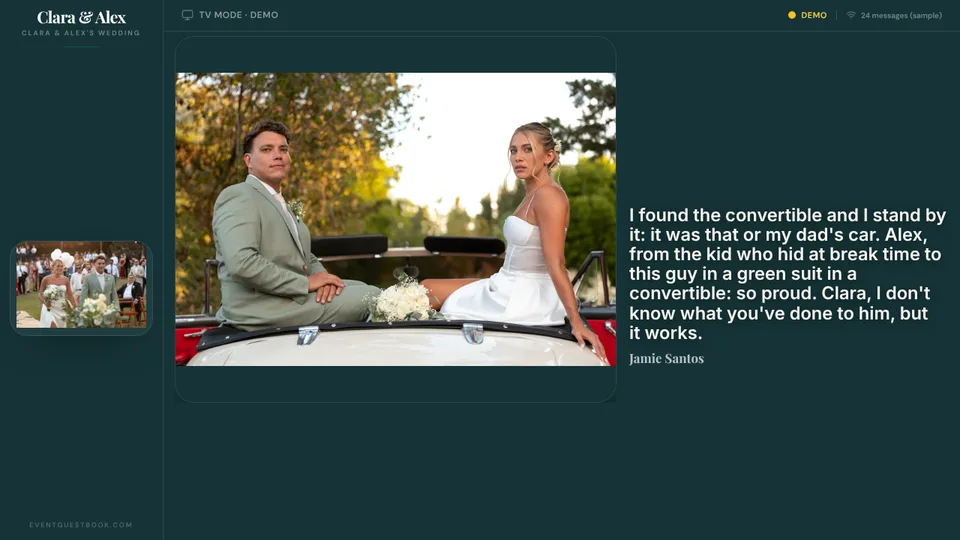
One of the most special ways to use a QR code guest book is to show the messages during the event. Instead of staying hidden until the next day, they appear on a screen, TV or projector.
The live wall works best when guests are relaxed: cocktail hour, dinner, the open bar or a pause between moments. Seeing messages on screen is moving, and it nudges other guests to write theirs.
If your event calls for more control, moderation matters. You can review what has come in and hide anything that doesn't fit the tone of the day.
There's more on this in the guide to a live wedding message wall.
Ideas for weddings, First Communions and other events
Most people search for this with weddings in mind, but a QR code guest book works at many kinds of celebrations.
At a wedding, it collects messages from family, friends, coworkers and people who might never walk up to a paper book. At a First Communion, it gathers notes the child can keep as a memento; there are more ideas on the digital First Communion guest book page.
It also fits birthdays, anniversaries, baptisms, retirements, private parties and corporate events. The code can go at the entrance, on the tables or next to a screen, and the live wall helps bring the room to life.
If you'd like inspiration before creating yours, browse the sample digital guest books.
Tips to get more guests to take part
Having a QR code doesn't guarantee everyone will use it. Participation improves when the message is clear, the code is visible and someone reminds guests it exists.
Some practical recommendations:
- Use a direct line, such as "Leave us a message."
- Say that no app is needed.
- Put the code where people wait: entrance, seating chart, bar or tables.
- Share the link before the wedding.
- Ask someone close to leave the first few messages and break the ice.
- Have the DJ, the emcee or your wedding planner mention the book during cocktail hour.
- Show a few messages on screen so more guests join in.
- Keep the sign clean: the code, a short line and one simple instruction.
- Don't bury the code in decor.
Before you decide what your event needs, check plans and pricing.
Common mistakes with a QR code guest book
The QR code makes taking part much easier, but a few mistakes come up often:
- Putting it in one hard-to-see spot. If the code is hidden, many guests will never notice it.
- Printing it too small. It should scan easily from a comfortable distance.
- Not saying what it's for. Add a clear line so nobody thinks it's the menu, a survey or a generic website.
- Not testing it before the event. Scan it with several phones and check that everything works.
- Forgetting to share the link. The link is how people take part before and after the wedding.
- Not preparing the screen if you plan to show the wall. If you're using a TV or projector, test the connection, the browser and the resolution.
- Making it look complicated. The simpler the instruction, the more people will join in.
The best signage is the kind people understand in three seconds.
Frequently asked questions
What is a QR code guest book?
It's a digital guest book that guests open by scanning a QR code, so they can leave their messages from their phones.
Do guests need to download an app?
No. They only need to scan the code or open the link and write from their browser.
Can I share it as a link?
Yes. Besides the QR code, you can send the link by text, email or group chat so guests can take part before, during or after the event.
Can guests upload photos?
Yes. Each guest can add a photo to their message (up to 4 with Premium).
Can the messages be shown on a screen?
Yes. The live wall shows messages on a TV or projector during the event.
Does it replace the traditional guest book?
It can replace it or complement it. Many couples keep a paper book as a decorative keepsake and use the QR code to collect more messages and photos.
Where is the best place for the QR code?
Ideally in several visible spots: the welcome table, the seating chart, the tables, the photo backdrop or the cocktail area. You can also send the link.
Is it only for weddings?
No. It also works for First Communions, birthdays, anniversaries, baptisms and corporate events.
Create your QR code guest book
With EventGuestBook you can create your digital guest book, share it by QR code or link and receive your guests' messages and photos in an online book that's lovely to look at and easy to browse.
Start with the digital wedding guest book page to see the whole idea, or create your event right away if you already know you want to collect more memories from your guests.
Related articles

Digital guest books for wedding planners: how to offer one to your couples
An extra that adds no logistics to the wedding day if you plan it well: who creates it, when to set it up, how to show it on a screen and which plan suits each couple.
7 min
Messages, photos and voice notes: what your wedding keepsake looks like when guests give all three
A message tells you what someone thinks, a photo shows how it felt and a voice note gives you their voice back. Here is how your wedding keepsake changes when guests leave all three.
8 min
How to get guests to sign your wedding guest book
Participation is a matter of friction and timing, not nagging. What actually moves the needle before, during and after the wedding.
8 min