Digital wedding guest book: what it is, how it works and what guests can leave
The same thing happens to the paper guest book at almost every wedding: it sits on a table by the entrance, the first people to arrive sign it, someone moves it during cocktail hour and from then on it's half forgotten. You end up with twenty signatures from a hundred and twenty guests and three pages nobody can read.
A digital guest book fixes exactly that. Instead of waiting for people to pass by a table, the book travels with them on their phones.
What it is, exactly
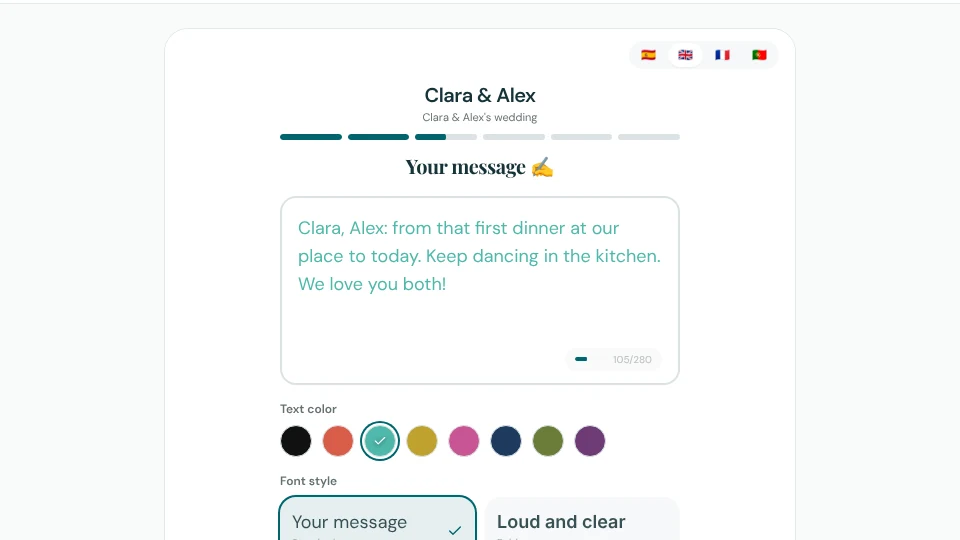
It's an online space, private to your wedding, where guests leave their message from their phone. They get in through a printed QR code (on the tables, by the photo backdrop, on the seating chart) or through a link you can send ahead of time.
There's no app to download and no account to create: the guest scans, writes and sends. That is the practical difference that matters most, because it decides whether the aunt who isn't comfortable with her phone takes part or not.
As hosts, you get a dashboard where you see everything as it arrives, organized by event and not mixed in with anything else.
What a guest can leave
Three things, all in the same message:
A written note. The classic guest book message, only legible. If they don't know what to write, a specific question on the QR code sign usually does it: "tell us how you met us." There are more ideas in what to write in a guest book and in these wedding guest book messages from guests.
A photo. Their photo, not the photographer's: the table before anyone sits down, the dance floor, the silly moment over dessert. These are the pictures that would otherwise stay in their camera roll forever.
A voice note. This is the part that surprises people most. Hearing someone's voice congratulating you is quite different from reading it, especially a few years later.
Each message arrives signed with the sender's name, so afterwards you know who's who without deciphering handwriting.
How it works on the wedding day
- Before. You create the event, add the names and the date, and get the QR code to print. It doesn't take long. The slow part is deciding where to put it.
- During. Guests scan and send. You can show the messages on a screen or TV in the room with the live wall, which doubles as a reminder: people see messages appear and feel like leaving their own.
- After. Everything is gathered in your book. Read it at your own pace, download it and share it with whoever you like.
On where to put the QR code so people really see it, this guide to QR codes on wedding tables gets to the point, and these wedding QR code sign ideas cover the wording.
How it compares with the paper book
It isn't that one is better in the abstract. They solve different things.
The paper book is a beautiful object. You can touch it and it depends on nothing. In exchange, few people take part, it can't hold photos or voices, and if it's lost there's no copy.
The digital one wins on participation and on content (text, photo and voice together), and it doesn't get lost. In exchange, you don't have an object on the table that same day, unless you print the result later.
Some couples do both: a notebook for anyone who wants to write by hand, and a QR code for everything else. If you're undecided, the full comparison is in digital vs. traditional guest book.
Questions that usually come up
What about older guests?
It's the number one worry, and the honest answer is that most manage fine, because scanning a QR code and typing in a text box is no harder than sending a text message. Those who don't usually sort it out with help from someone at their table. It helps a lot if the sign says what will happen when they scan.
Do we need Wi-Fi?
It works on mobile data. If your venue has poor coverage, check beforehand and, if needed, let guests know they can send their message when they get home. That's one advantage of the format: the book stays open after the wedding.
Can we review the messages before anyone else sees them?
There is no approval step: each message appears in the book and on the wall as soon as it is sent. From your dashboard you see everything as it comes in and can hide or delete any message; only the hosts see the dashboard.
Can we have it on paper in the end?
You can export the book as a PDF and take it to any print shop. Printing isn't included, so the realistic route today is the PDF.
How much does it cost?
There's a free Demo to try it out, with up to 5 messages, and paid plans with a single payment per event. The current details are on the pricing page.
If you'd like to see it before deciding
The quickest way is to look at a finished sample book and, if you like it, create your book for free and send the link to yourselves. In five minutes you'll know whether it fits your wedding, better than you would from reading any explanation, this one included.
Related articles

Digital guest books for wedding planners: how to offer one to your couples
An extra that adds no logistics to the wedding day if you plan it well: who creates it, when to set it up, how to show it on a screen and which plan suits each couple.
7 min
Messages, photos and voice notes: what your wedding keepsake looks like when guests give all three
A message tells you what someone thinks, a photo shows how it felt and a voice note gives you their voice back. Here is how your wedding keepsake changes when guests leave all three.
8 min
How to get guests to sign your wedding guest book
Participation is a matter of friction and timing, not nagging. What actually moves the needle before, during and after the wedding.
8 min