Sharing wedding photos: group chat, shared album or QR code?
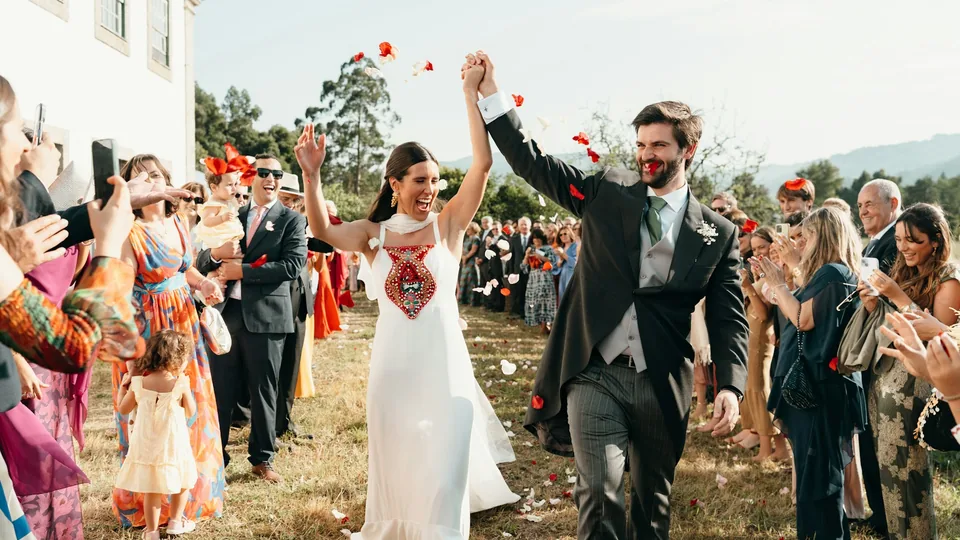
The wedding group chat is a great idea until three things happen.
First: two hundred "you look amazing!" messages arrive and the photos get lost among them. Second: some of your guests aren't in the group, because nobody adds the great-aunts from out of state. And third, the worst: a few months later you open the chat, look for one specific photo and it isn't where you thought it was.
It's nobody's fault. Group chats simply aren't made for that.
Why it seems like such a good idea
I don't want to pick a silly fight with the group chat. It's useful, everyone knows how to open it, and the wedding group already exists for sharing schedules, directions, shuttle times and the classic question about whether to bring a jacket.
The next day, people want to stay there too. Someone sends a photo of the couple, someone else replies with hearts and, for a while, the group keeps the party going. It's lovely.
The trouble starts when we expect that conversation to behave like an archive. Sending five pictures to chat about them is one thing. Sharing the wedding photos in a group chat with eighty people, and trusting you'll be able to gather them all later, is another.
The group wins by inertia: it already exists and needs no explanation. It loses the moment you need order, broad participation and a keepsake you can browse without scrolling through a thousand messages.
Problem 1: the photos get buried under the conversation
Imagine your friend posts ten photos from dinner at 11:42. At 11:43 someone asks who found a green purse. Then come fourteen congratulations, three stickers, a conversation about brunch and a pin for a bar.
By Monday, those ten photos are several screens away. In two months you won't remember who sent them or when. You can open the group's media tab, yes, but there they're mixed in with map screenshots, menus, invitations and every other image that went around.
The conversation also loses the context. You see a photo of four people laughing, but the message explaining the joke is twenty replies further down.
In an album designed for the wedding, the picture and the message travel together. In a chat, they separate as soon as everyone starts talking.
Problem 2: the whole guest list is never in it
There are friend groups, family groups, the shuttle group and another one called "Wedding FINAL for real this time," created because the previous one included someone who wasn't supposed to see a surprise.
Which one do you ask for photos in?
Pick one and you leave people out. Post in all of them and you get duplicates and have to remember what to check. Creating a new group with everyone isn't so innocent either: you share phone numbers among people who may not know each other, and you drop a hundred and fifty guests into a conversation they didn't ask for.
Older relatives are usually the ones left behind. Not because they don't take pictures (they take plenty), but because nobody adds them, or because they mute the group after ten minutes. Your aunt may have exactly the shot you wanted and never see the request.
A link or a QR code avoids that list. Anyone at the celebration can get in without their phone number being exposed to everyone else.
Problem 3: receiving a photo isn't the same as keeping it
A picture in a chat depends on several things: that it was downloaded, that it wasn't sent as a view-once message, that it's still on the device and that the person hasn't cleared their storage.
It depends on you, too. Maybe you switch phones, delete the group by accident or turn off automatic downloads to free up space. When you need the photo, you find you remember seeing it but not where it ended up.
A messaging app is a delivery route, not your archive plan. If you do use one, download the pictures, make an organized copy outside the app and do it soon. Leaving it for "when we're back from the honeymoon" is an elegant way of never doing it.
The quality question: what happens when you send a photo
Most messaging apps compress photos by default so they send faster. WhatsApp, for example, sends at standard quality unless the sender picks its HD option, and photos texted between different kinds of phones have a long history of arriving noticeably degraded.
There's no single honest percentage you can apply to every image. A vertical shot from a recent phone, a screenshot and a picture sent in HD don't travel the same road. Higher-quality options keep more detail, but they require each guest to remember to choose them.
Some apps let you send an image as a file to avoid the usual photo processing, though it adds steps and feels unnatural to many people. Ask a hundred and twenty guests to do it and you'll get a hundred and twenty interpretations.
That said, it wouldn't be right to sell the QR code as a vault for untouched originals. EventGuestBook optimizes photos on upload. The difference lies in order and experience: every photo lands in the event's space, attached to its message, without passing through a group conversation.
The alternatives, and the catch with each
No tool is perfect for every wedding. Some systems fit better depending on the number of guests, the kind of keepsake you want and how much tech support you feel like providing the following Sunday.
A Google Drive folder
The good: you know the service, you can organize subfolders and you control what you download.
The catch: some guests will need to sign in, switch accounts or request access. Permissions have to be set up very carefully. Someone used to Drive handles it in seconds. Your uncle may give up at the sign-in screen.
Use it if the group is small and comfortable with technology. Test it first with someone outside your account.
A shared iCloud or Google Photos album
The good: it's pleasant for viewing pictures and can work very well in a group where everyone uses the same kind of phone.
The catch: not everyone has the same phone, account or settings. Invitations to contribute get lost, and the experience changes from one device to the next.
It works better among close family than as a universal door for a big wedding.
A dedicated wedding app
The good: it usually offers a gallery, organization and features designed for events.
The catch: if it requires downloading an app, signing up or typing a long code, some guests will drop off along the way. Check the price, too, and how long you'll have access.
Here I'd apply one rule: if you need a four-screenshot tutorial to explain how to upload a photo, you've lost half the table.
Disposable cameras
The good: they're fun, they decorate the tables and they make people look at the day differently.
The catch: you have to buy them, hand them out, collect them and get them developed. You don't know what came out until afterwards, and many photos will be dark, repeated or accidental. They're charming as a game. As your only method, they leave too much to chance.
Sending one by one
The good: for two or three people close to you, it gives you control and lets you ask for a specific picture.
The catch: it turns you into a delivery manager. You end up with images in texts, email, AirDrop and direct messages on several apps.
Keep it for rescuing individual pieces, not for gathering the whole album.
Quick comparison
| Shared album | Group chat | Digital guest book | |
|---|---|---|---|
| Needs an account or app | Often | They already have it | No |
| Collects messages | No | Yes, mixed in | Yes, next to each photo |
| Collects voice notes | No | Yes, mixed in | Yes |
| Image quality | High | Compressed by default | Optimized on upload |
| You know who sent what | Partly | Yes | Yes |
| Can be shown on screen at the event | Not natively | No | Yes |
| Cost | Free, within your storage | Free | Free Demo with a limit; paid plans |
The QR code option: less chatter, more photos where they belong
The QR code isn't trying to replace the group chat. In fact, they get along well: you put the code out at the wedding, and the next day you send the same link to the group.
The difference is the destination. Instead of asking for the pictures to stay inside the chat, you point everyone to a digital guest book for events. Each guest opens the page in their browser, leaves a few words and adds a photo.
They don't need to install anything or see anyone else's phone number. You receive everything in the event's space and can review it afterwards.
To make it work, I'd do this:
-
Test the QR code on several phones. A recent one, and one that has a few weddings behind it.
-
Add a clear line. "Share a photo the couple hasn't seen" beats "Scan here."
-
Put it on the tables. That's where people have time, conversation and photos of their own group.
-
Send one reminder the next day. Once. Kindly. No lists of who's missing.
-
Download in time. With Pro, the photo ZIP can be downloaded for a limited time after the event (currently 90 days).
The whole process is in the guide on how to collect wedding photos from all your guests, and the practical details in how a QR code for wedding photos works.
An honest conclusion: the group can stay
There's no need to close the group or forbid anyone from posting a photo there. Use it for what it does well: chatting, saying thank you, sharing two or three sneak peeks and laughing about what happened.
To gather the keepsake, create another destination.
It's a small difference, but it changes everything. In the chat, the photo competes with the conversation. In the album, the conversation explains the photo.
Frequently asked questions
Do messaging apps reduce photo quality?
Usually, yes: by default most of them process images to make sending faster. Some offer a higher-quality option, but each person has to choose it. The result varies with the image, the device and how it's sent.
Can I ask guests to send photos as files?
Yes, it's an option for people who are comfortable with their phones, but it adds steps and complicates collecting at scale. It's rarely the most accessible solution for all your guests.
Why not create one group with the whole wedding?
Because you expose phone numbers, generate a lot of noise and someone is always left out. And a chat doesn't organize pictures the way an album does.
Is Google Drive better than a group chat?
It's better for organizing files, but it can require an account, permissions and some confidence. It works for a small group. At a big wedding it tends to produce questions and drop-offs.
What does a guest need to use a QR code?
A phone with a camera, a browser and an internet connection. They don't have to download an app or sign up for EventGuestBook.
Does the QR code keep photos exactly as they are on the phone?
It's better not to promise that: the platform optimizes images on upload. The benefit is gathering them easily, together with their messages.
Can I still send the link to the group chat?
Yes, and it's very useful. The group distributes the link. The album receives and organizes the photos.
When should I download the pictures?
If you have Pro, do it within the download window after the event (currently 90 days). Set a reminder so it doesn't get lost between the honeymoon and the thank-you notes.
Give each tool its job
Let the group chat handle the "what a great night" and let the album handle keeping what happened.
You can create an event for free and send the link to three people as a test. If the photos arrive without anyone asking you where to tap, that's one less worry for the wedding day.
Related articles

Digital guest books for wedding planners: how to offer one to your couples
An extra that adds no logistics to the wedding day if you plan it well: who creates it, when to set it up, how to show it on a screen and which plan suits each couple.
7 min
Messages, photos and voice notes: what your wedding keepsake looks like when guests give all three
A message tells you what someone thinks, a photo shows how it felt and a voice note gives you their voice back. Here is how your wedding keepsake changes when guests leave all three.
8 min
How to get guests to sign your wedding guest book
Participation is a matter of friction and timing, not nagging. What actually moves the needle before, during and after the wedding.
8 min